
 |
 |
 |
|||||||||||||||||||||||||||||||||||||||||||||||||||||||||||||||||||
 |
TinyChat is a small, simple Mac and PC chat program. It works over any TCP/IP network--LAN, WAN, or the Internet. TinyChat is a very simple program, so why on Earth would you want to use it? Unlike other chat programs, TinyChat is a direct, per-to-peer chat program. There is no server; you connect directly to the person you are chatting with. (With programs such as AOL Instant Messenger, you connect to AOL's big server system, and the person you are chatting with connects to AOL's server; if both of you don't have accounts (or "screen names") on the server, you can't talk to each other.) It also means your conversations are more private; they don't pass through a central server, so they can't be intercepted and recorded. This version also includes built-in encryption (RC4) for greater privacy, as well. TinyChat also allows you to exchange pictures with the person you're chatting with, by dragging the pictures from your hard drive to the TinyChat picture window. The current version is Beta 8. It's easy to install (no special installers or system components or extensions) and easy to remove (just drag it to the trash). Any ideas? Send 'em in! I may implement them in the final version. 1.0b8 Notes: - If you are behind a router or firewall, you must enable port forwarding on port 1299 to receive a chat connection.- Encryption is now available! - This version includes an Address Book feature. - A new feature has been implemented to let you know when your partner is typing something. - This version fixes a crash-on-start problem in Windows XP. - To exchange pictures in the Windows version, please install Apple's QuickTime. TinyChat is free. To download the MacOS Classic version, click here To download the PC version, click here. To download the MacOS X version, click here.
Zen is cute. Zen is fun. Zen is a simple little application that you can put in your computer's Startup folder, or just run it whenever you want. What Zen does is search several text files of "fortune cookie" sayings, and display one at random. The fortune cookie files are just plain text; you can use your favorite text editor application to edit them file to include whatever pithy pearls of wisdom you like. Each message can be as long as you want; the messages are separated with two RETURN characters. A large collection of fortune cookie files is available for download from this site. Zen was inspired by the program "COOKIE," first written in FORTRAN for PDP computers back in the day, and since then ported to almost every computer and operating system on earth. (I myself wrote a version of Cookie for the DECsystem-20 back in 1984, and for the TRS-80 in 1985.) Zen is very simple; on launch, it scans the ZEN.TXT file and chooses one of the entries at random. The "AGAIN" button chooses a different random fortune; the QUIT button quits.
Zen is freeware. Zen 3 is compatible with MacOS X 10.3 ("Panther") and higher and Windows XP and higher. The Linux version requires Linux for x86 (PC). To download the Mac version, click here To download the PC version, click here. To download the MacOS X version, click here. To download the Linux version, click here.
Registry Permission Tool is a freeware tool to enable and disable Registry editing on Windows systems. The Windows Registry contains a key which, when set, prohibits the user from modifying the Registry with RegEdit. If the key is set, you'll see a message saying "Registry editing has been disabled by your administrator".
Registry Permission Tool ("rpt.exe") will reset this flag, so you can edit your Registry. This is useful because many common computer viruses, such as W32/Gibe and W32/Swen, modify your Registry, then set the flag to prevent you from undoing the damage. Commercial antivirus tools will remove the virus, but they cannot restore the Registry because they have no way to know what the original Registry settings were. Registry Permission Tool can be used to lock or unlock Registry editing, making manual cleanup after a virus infection much easier. Windows XP only. Freeware.
To download the .zip archive, click here.
RandomImage is a Perl script that allows a Web programmer to write a Web page that loads a random image when a user visits the page. Freeware. To download the Stuffit archive version, click here To download the .zip archive version, click here. These are additional "fortune cookie" files you can use with Zen (or other fortune cookie programs). Each one is a plain-text file that you can edit with your favorite text editor or word processor, and each one covers a different "theme." These files are saved as .ZIP archives for PC and as .SIT archives for Mac, and each includes a readme file with instructions and a Zen Frequently Asked Questions (FAQ) list. To download, click on the "Mac" or "PC" next to the one you want. To use, uncompress the archive and place the fortune file in the FORTUNES folder within the Zen folder.
|
 |
|||||||||||||||||||||||||||||||||||||||||||||||||||||||||||||||||
 |
|||||||||||||||||||||||||||||||||||||||||||||||||||||||||||||||||||
 TINYCHAT version 1.0b8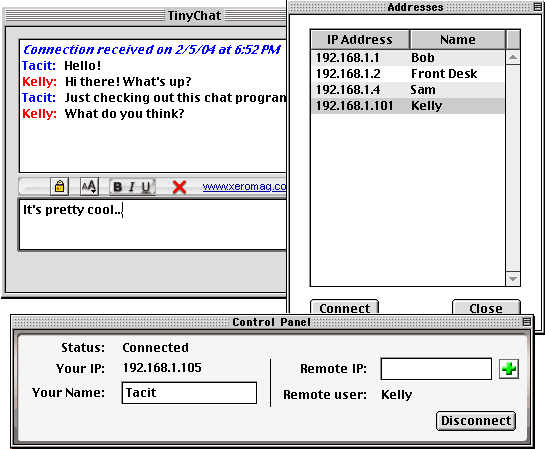
 ZEN version 3.0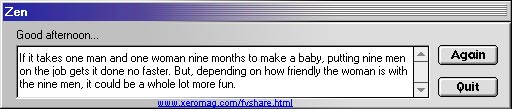
 REGISTRY PERMISSION TOOL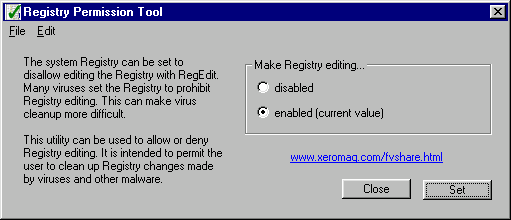
 RANDOMIMAGE